Search RFC: |                                     
Please support my efforts by ADVERTISING!
About | Sitemap | Homepage Archive
Serving a Pleasant Blend of Yesterday, Today, and Tomorrow™
Vintage Magazines
Electronics World
Popular Electronics
Radio & TV News
QST | Pop Science
Popular Mechanics
Radio-Craft
Radio-Electronics
Short Wave Craft
Electronics | OFA
Saturday Eve Post
Please Support My Advertisers!
RF Cafe Sponsors
Aegis Power | Centric RF | RFCT
Alliance Test | Empower RF
Isotec | Reactel | SF Circuits

Formulas & Data

Electronics | RF
Mathematics
Mechanics | Physics


Calvin & Phineas

kmblatt83@aol.com

Resources

Articles, Forums, Radar
Magazines, Museum
Radio Service Data
Software, Videos


Artificial Intelligence

Entertainment

Crosswords, Humor Cogitations, Podcast
Quotes, Quizzes

Parts & Services

1000s of Listings

        Software:

Please Donate
RF Cascade Workbook | RF Symbols for Office
RF Symbols for Visio | RF Stencils for Visio
Espresso Engineering Workbook
Exodus Advanced Communications Best in Class RF Amplifier SSPAs - RF Cafe

RF Cascade Workbook© 2005 User's Guide - Chapter 6

Chapter 1, 2, 3, 4, 5, 6, 7, 8, 9, 10, 11, 12, 13

Version 1.11

by Kirt Blattenberger

RF Cafe Website

(www.rfcafe.com)

Chapter 6

6    Inband Plots

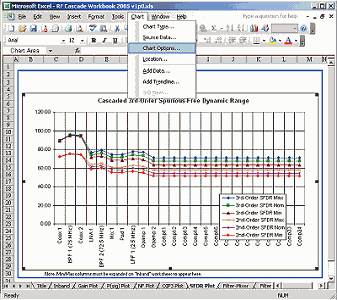
Five worksheets with graphs are provided for the Inband parameters by default. You may, of course, add as many graphs as necessary to plot parameters. Each graph adds about 10 kBytes to the file size. A lot of online help is available through Excel for working with graphs. Most parameters can be modified by double clicking on the item you want to change. When a graph is selected, the “Chart” menu item appears on the main menu bar in place of the “Data” menu (see Figure 11). From there, you can access all of the graph setup parameters.

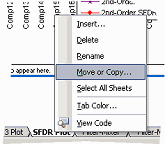
If you want to add another graph worksheet, the simplest way is to right click on the bottom worksheet tab and select the “Move or copy…” menu item, and instruct Excel to make a copy per Figure 10.


   RF  Cascade Workbook 2005 - RF Cafe

RF  Cascade Workbook 2005 - RF Cafe

Figure 10    Copying A Chart Worksheet

RF  Cascade Workbook 2005 - RF Cafe

Figure 11    SFDR Plot

Chapter 1, 2, 3, 4, 5, 6, 7, 8,

        9, 10, 11, 12, 13

Version 1.11

by Kirt Blattenberger

RF Cafe Website

(www.rfcafe.com)

Chapter 6

Exodus Advanced Communications Best in Class RF Amplifier SSPAs - RF Cafe