Search RFC: |                                  
Please support my efforts by ADVERTISING!
Serving a Pleasant Blend of Yesterday,
Today, and Tomorrow™

Vintage Magazines

Electronics World
Popular Electronics
Radio & TV News
QST | Pop Science
Popular Mechanics
Radio-Craft
Radio-Electronics
Short Wave Craft
Electronics | OFA
Saturday Eve Post

Formulas | Data

Electronics | RF
Mathematics
Mechanics
Physics


Calvin & Phineas

kmblatt83@aol.com

Archive | Sitemap

Resources

Articles | Radar
Cogitations
Magazines | AI
RF Museum
Software | Videos
Radio Service
Tech Notes

Entertainment

Crosswords
Humor | Podcasts
Quotes | Quizzes
Tech Comics

Parts | Services

1000s of Listings


About RF Cafe

Software: RF Cascade Workbook | RF Symbols for Office | RF Symbols & Stencils for Visio | Espresso Workbook
Please Support My Advertisers!
Transcat | Axiom Test Equipment - RF Cafe
Aegis Power | Centric RF | RFCT
Empower RF | Reactel | SF Circuits

Alliance Test | Isotec
Exodus Advanced Communications Best in Class RF Amplifier SSPAs

Johanson Prototyping Kit - RF Cafe

Anritsu MG36021A Microwave Frequency Synthesizer Module  - RF Cafe
Espresso Engineering Workbook

Amplifier Solutions Corporation (ASC) - RF Cafe

Werbel Microwave power dividers, couplers - RF Cafe

Please Support RF Cafe by purchasing my ridiculously low-priced products, all of which I created.

RF Cascade Workbook for Excel

RF & Electronics Symbols for Visio

RF & Electronics Symbols for Office

RF & Electronics Stencils for Visio

RF Workbench

T-Shirts, Mugs, Cups, Ball Caps, Mouse Pads

These Are Available for Free

Espresso Engineering Workbook™

Smith Chart™ for Excel

RF Cascade Workbook© 2005 User's Guide - Chapter 10

minimum height spacer

Chapter 1, 2, 3, 4, 5, 6, 7, 8, 9, 10, 11, 12, 13

Version 1.11

by Kirt Blattenberger

RF Cafe Website

(www.rfcafe.com)

Chapter 10


10    DC Power Budget

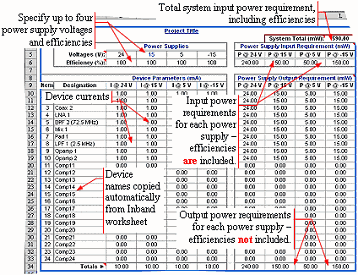
On this worksheet, cells are provided for entering the power supply voltages and currents for each device. Efficiencies are also assigned to each supply to permit the total system input power to be calculated.

Enter the supply voltage(s) in the cells at the top. Negative values do not affect the power calculation. The titles of the current and power columns will automatically change to reflect the values entered for the voltages.

Enter the efficiency of each supply to permit a total system power requirement to be calculated. Enter “100” for the efficiency otherwise.


Parameter

Description

Range

Tolerance

Units

Voltages

Power supply nominal output voltages

-500 to +500

-

V

Efficiency

Efficiency in converting from input voltage to output voltage

1 to 100

-

%

Device Parameters

Device current requirement

-105 to +105

-

mA

Table 7    DC Power Budget Input Parameters

Power calculation is straight forward as follows, where the power is the required output power from the associated supply:

RF  Cascade Workbook 2005 - RF Cafe

The system supply input power requirement is calculated using the efficiency value for each voltage:

RF  Cascade Workbook 2005 - RF Cafe

RF  Cascade Workbook 2005 - RF Cafe

Figure 18    DC Power Budget

Chapter 1, 2, 3, 4, 5, 6, 7, 8,

        9, 10, 11, 12, 13

Version 1.11

by Kirt Blattenberger

RF Cafe Website

(www.rfcafe.com)

Chapter 10