My daughter, Sally, recently bought me a
Dilbert Electronic Candy Dispenser at a second-hand store. We soon learned the reason
it was there and not dispensing candy electronically on someone's desk.
When
I loaded in a fresh set of batteries and pressed Dilbert's computer mouse, nothing
happened. I whipped out the DMM and measured the voltage at the two AA batteries
as 3.2 V with the switch open, and about 2 V with the switch closed. The system
was getting voltage and drawing current, but nothing was happening.
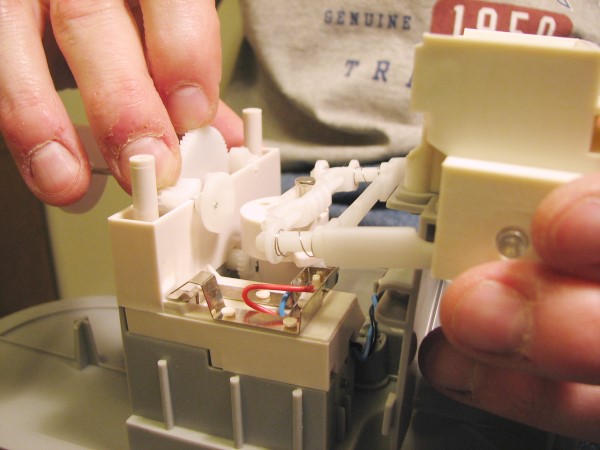
I disassembled the contraption (no easy task),
and assessed the situation. The cam-operated shutoff switch was crammed against
a stop, but it was not apparent why. I then pried out the little DC motor and verified
that voltage was getting to the motor. Having messed around with many similar motors
as a kid, and noting that basically nothing has changed over the years, I confidently
unbent the two case retaining tabs and pulled the rotor assembly out from the stator
magnets.
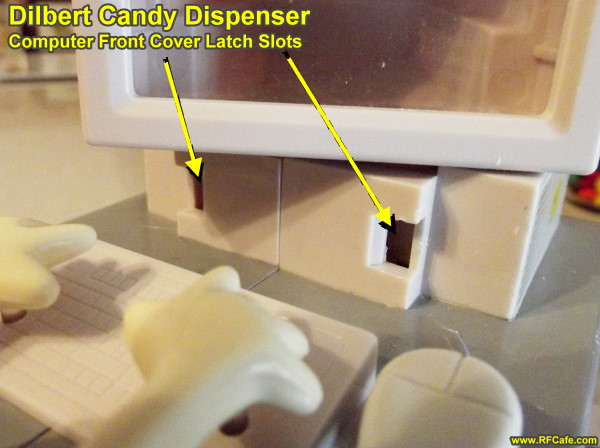
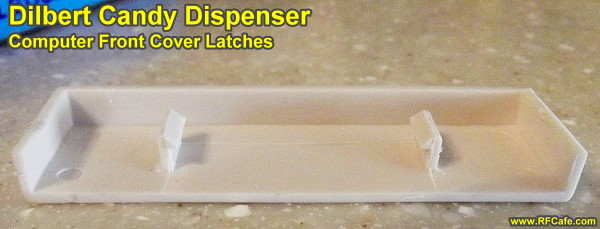
The
key to getting it apart is removing the CPU front cover beneath the computer monitor.
I used a thin metal 6" engineering ruler (scale). The cover snaps in on each side
with a little locking tab. It will take a lot of force to pry the tabs out of the
holes, but I have done it at least three times with no damage to the tabs or the
mating holes.
Be sure to note the placement
of all the gears and cams as you disassemble everything since the timing of the
electrical switch is dependent on getting it back together correctly.
There were carbon deposits
all over the brushes (2) and commutators (3), along with some poorly applied grease
that was supposed to be at the rear rotor support (not on the brushes). A little
MEK on a Q-tip took care of the misplaced grease, and then some 600 grit sandpaper
on the brushes and commutators took care of the carbon deposits. The motor was reassembled
and then fired up while still outside the dispenser housing.
After
reinstalling the motor and aligning its gear with the main dispenser gear, I pressed
the start button and it immediately started to run and then stall. I hurriedly removed
one of the AA cells to prevent damage; it is not possible to put the batteries in
backwards. Upon close examination of the situation, it became obvious that the entire
gearworks was running backwards, causing the cam-operated shutoff switch to get
jammed into the cam rather than ride over the top of it. A quick reversal of the
two wires at the battery box rectified (literally) the problem; soldering required.
Everything
else was cleaned (remember that it was second-hand) and reassembled. The video below
shows the results.
RF Cafe began life in 1996 as "RF Tools"
in an AOL screen name web space totaling 2 MB. Its primary purpose was to provide
me with ready access to commonly needed formulas and reference material while performing
my work as an RF system and circuit design engineer. The World Wide Web (Internet)
was largely an unknown entity at the time and bandwidth was a scarce commodity.
Dial-up modems blazed along at 14.4 kbps while tying up your telephone line,
and a lady's voice announced "You've Got Mail" when a new message arrived...


 My daughter, Sally, recently bought me a
Dilbert Electronic Candy Dispenser at a second-hand store. We soon learned the reason
it was there and not dispensing candy electronically on someone's desk.
My daughter, Sally, recently bought me a
Dilbert Electronic Candy Dispenser at a second-hand store. We soon learned the reason
it was there and not dispensing candy electronically on someone's desk.
 This archive links to the many video and audio
files that have been featured on RF Cafe.
This archive links to the many video and audio
files that have been featured on RF Cafe.