Search:                        
Please support my efforts by ADVERTISING!
Serving a Pleasing Blend of Yesterday, Today, and Tomorrow™

Vintage Magazines

Electronics World
Popular Electronics
Radio & TV News
QST | Pop Science
Popular Mechanics
Radio-Craft
Radio-Electronics
Short Wave Craft
Electronics | OFA
Saturday Eve Post
Electronics Illustrated

Formulas | Data

Electronics | RF
Mathematics
Mechanics
Physics


Calvin & Phineas

Archive | Sitemap
kmblatt83@aol.com

Resources

Radar | AI
Cogitations
RF Museum
Videos | Pics |
Things | Logos
Radio Datashts
WJ Tech Notes
Day in History

Entertainment

Crosswords
Humor | Podcasts
Quotes | Quizzes
Tech Comics

Parts | Services

1000s of Listings


About RF Cafe

Software: RF Cascade Workbook | RF Symbols for Office | RF Symbols & Stencils for Visio | Espresso Workbook
Modular Components - RF Cafe

!!!  Run-Time Error 200 Has Been Fixed  !!!

Around 1998, I had been getting an increased number of reports that the Run Time Error 200 message continues to appear even after running the "install.bat" program. After finally locating a computer that duplicated the problem, I found a remedy. A search on the Internet turned up a patch to the CRT unit for Borland Pascal that fixes the problem.  Let's hope the GHz processors on the horizon don't create a whole new host of problems for DOS relics.

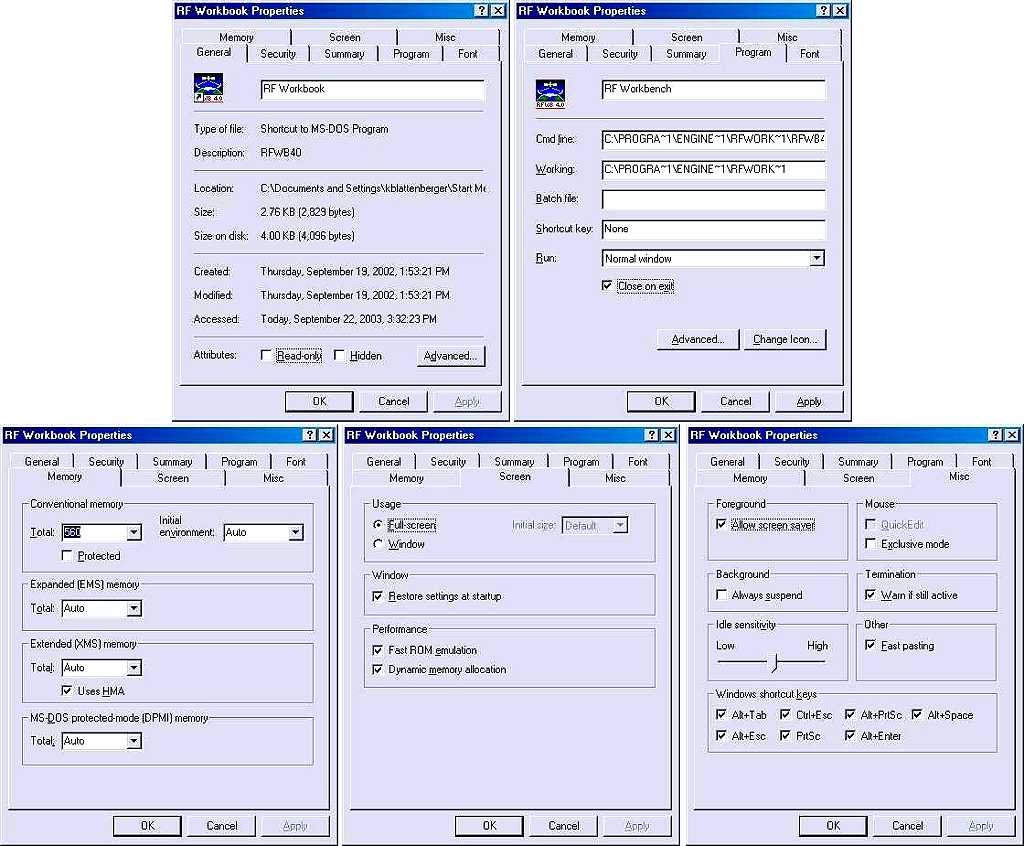
 - RF Cafe WebsiteIf you are having problems with Windows NT or Windows 2000, please click here for screen shots of the File Properties setup I use at work for Win2000 that is usually successful.

A number of people have contacted me regarding problems getting RF Workbench to run (not including the RTE 200 problem). To my knowledge, the problem has always been resolved by running the "install.bat" program that comes zipped up with RF Workbench. Here is a listing of the file. Subdirectories will be created by the batch file that are essential for RF Workbench to execute. If the mixer files (*.mf3) ended up in the root directory, move them to the .\mixers subdirectory.


In order to run, RF Workbench requires that the following directory structure be created:

    .\rfwb40

    .\rfwb40\data

    .\rfwb40\mixers

    .\rfwb40\plans

    .\rfwb40\systems

Following is the content of the "install.bat" file:

echo off

echo .

echo .

echo *************************************************************

echo

echo RF Workbench requires 1 MByte of hard drive space to install.

echo

echo *************************************************************

echo .

pause

echo .

mkdir c:\rfwb40

mkdir c:\rfwb40\data

mkdir c:\rfwb40\mixers

mkdir c:\rfwb40\plans

mkdir c:\rfwb40\systems

copy *.* c:\rfwb40

copy .\mixers\*.mf3 c:\rfwb40\mixers

echo .

echo Please refer to Readme.txt for more info on RF Workbench 4.0.

echo .

pause

KR Electronics (RF Filters) - RF Cafe
Please Support My Advertisers!
Aegis Power | Centric RF | RFCT
Empower RF | Reactel | SF Circuits

Alliance Test | Isotec
Crane Aerospace & Electronics (RF & Microwave) - RF Cafe

Transcat | Axiom Rental Equipment - RF Cafe

RF Cascade Workbook by RF Cafe
Tennode RF Connectors and Cables - RF Cafe

Innovative Power Products (IPP) Directional Couplers - RF Cafe

DAS DEALS Marketplace, Buy Sell RF Connectors - RF Cafe

Please Support RF Cafe by purchasing my ridiculously low-priced products, all of which I created.

RF Cascade Workbook for Excel

RF & Electronics Symbols for Visio

RF & Electronics Symbols for Office

RF & Electronics Stencils for Visio

RF Workbench

These Are Available for Free

Espresso Engineering Workbook™

Smith Chart™ for Excel