


RF Cascade Workbook for Excel
RF & Electronics Symbols for Visio
RF & Electronics Symbols for Office
RF & Electronics Stencils for Visio
RF Workbench
T-Shirts, Mugs, Cups, Ball Caps, Mouse Pads
Espresso Engineering Workbook™
Smith Chart™ for Excel
|
 |
RF Cascade Workbook© 2005 User's Guide |
|
Chapter
1,
2,
3,
4,
5,
6,
7,
8,
9,
10,
11,
12,
13
Version 1.11 by Kirt Blattenberger RF Cafe Website
(www.rfcafe.com)
Chapter 1
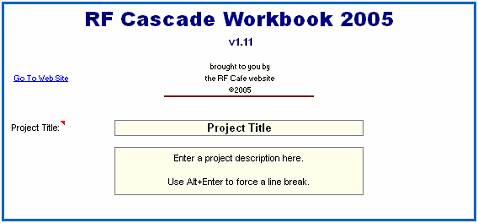
Important: You must select
“Enable Macros” when opening RF Cascade Workbook 2005,or
else the VBA code will not function.
|
|
|
Copyright 2005 - Kirt Blattenberger,
RF Cafe Website. This manual may not be reproduced in part
or in whole without the express, written permission of Kirt
Blattenberger or his assigns. Only licensed users of RF Cascade
Workbook may possess this manual.
|
|

Thank you for your support. Your contributions help keep
RF Cafe online.
|
Table of Contents |
- 1 Introduction
- 1.1 Terms of Use
- 1.2 VBA Code Access
- 2 Adding or Deleting Rows
- 2.1 Adding Rows
- 2.2 Deleting Rows
- 3 Inband System Specification
- 4 Device Specification
- 5 Inband Output (Calculated) Parameters
- 5.1 Gain (dB)
- 5.2 Noise Figure, NF (dB)
- 5.3 2-Tone, 2nd-Order Intercept
Point, OIP2 (dBm)
- 5.4 2-Tone, 3rd-Order Intercept
Point, OIP3 (dBm)
- 5.5 Saturated Power, P[sat] (dBm)
- 5.6 Signal Power, P[sig] (dBm)
- 5.7 Noise Bandwidth, NBW (MHz)
- 5.8 Noise Power, P[n] (dBm)
- 5.9 Signal to Noise Ratio, SNR (dB)
- 5.10 Saturated Dynamic Range, SDR (dB)
- 5.11 2nd-OrderSpurious-Free Dynamic
Range, SFDR2 (dB)
- 5.12 2nd Order Intermodulation
Product Power, OIMD2 (dBm)
- 5.13 Δ 2nd Order Intermodulation Products,
ΔOIMD2 (dB)
- 5.14 3rd-OrderSpurious-Free Dynamic
Range, SFDR3 (dB)
- 5.15 3rd Order Intermodulation
Product Power, OIMD3 (dBm)
- 5.16 Δ 3rd Order Intermodulation
Products, ΔOIMD3 (dB)
- 5.17 Interstage VSWR Mismatch Error (dB)
- 5.18 Cumulative VSWR Mismatch Error (dB)
- 6 Inband Plots
- 7 Filter-Mixer Worksheet
- 7.1 Input Frequency
- 7.2 Filters
- 8 Mixers + LOs
- 9 Filter-Mixer Plot
- 10 DC Power Budget
- 11 Bill of Material (BOM)
- 12 Conversion Formulas
- 12.1 Noise Temperature – to – Noise Figure
- 12.2 VSWR – to – Return Loss
- 13 Revision History
|
1
Introduction |
RF Cascade Workbook
is built on a foundation of RF Cascade Workbook 2003, and now
features frequency calculations for filters and mixers. Also
added are calculations for 2nd-order intermodulation products
As provided, there are 24 component positions; however, the
number of components (and frequency conversions) possible is
limited only by the capability of Excel. Most of the formulas
are contained in VBA routines to maintain uncluttered cells
and simple manipulation. This is especially helpful in the case
of conditional formulas. Expansion of the workbook to include
custom calculations is a simple matter. |
All of the formulas
used in RF Cascade Workbook are presented in the following paragraphs
to assist in understanding the operation of the spreadsheet.
Excel has a very extensive Help section for standard functions
and VBA code writing. |
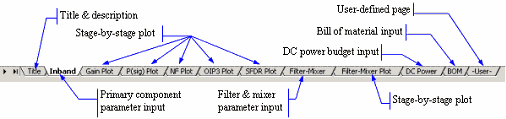
The bottom worksheet
tab image shown below is the default set of pages. Worksheets
with parameter plots can be added or deleted as necessary, and
the “DC Power,” “BOM,” and the “User” worksheets can be eliminated
entirely without affecting the primary functions. The “Filter-Mixer”
worksheet contains Noise Bandwidth and Frequency Units parameters
that are also used on the “Inband” worksheet, and therefore
must not be deleted. |
|
|
1.1
Terms of Use |
You may freely
modify RF Cascade Workbook for your own use; however, you may
not redistribute it under a new name after making changes. Furthermore,
you may not redistribute RF Cascade Workbook for any reason
without the written permission of Kirt Blattenberger/RF Cafe,
because this is licensed software protected under U.S. copyright.
RF Cascade Workbook is NOT shareware or freeware. |
Your use of RF
Cascade Workbook attests to your agreement to hold harmless
Kirt Blattenberger/RF Cafe and his assigns for any losses that
may occur as a result of the use of RF Cascade Workbook. Every
iota of code is available for review and discernment by the
user, who is consequently solely responsible for all results.
RF Cascade Workbook has been tested and is believed to be free
of errors upon release. |
Formulas used in
RF Cascade Workbook are not proprietary and have been obtained
from multiple publicly available sources. All are ideal implementations
without any personal “adjustments.” Min/max calculations are
constructed based on the author's notion of what constitutes
conditions that would generate extreme cases, but the user's
experience or specific circumstances might require the formula
variable combinations to be rearranged. |
Prior to using
this workbook for the first time, please be sure to create a
backup copy so the original version is always accessible. If
you loose track of the original (I've done that sort of thing,
too) and I have your name on file as a legal licensee, I will
gladly e mail a replacement version upon request. |
1.2
VBA Code Access |
Access to the VBA
code is made using the “Tools->Macro->Visual Basic Editor”
menu selection (Figure 1), and choosing the relevant page. Note
that different versions of Excel might have slightly different
menu structures, so your menu might look different from Figure
1. |
|

|
|
Figure 1
VBA Menu Access
|
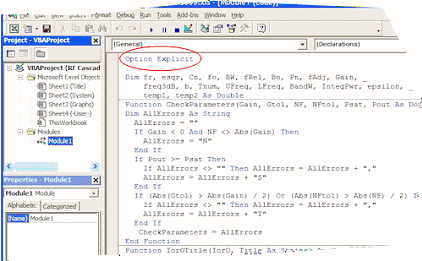
Figure 2 shows
a portion of the VBA code window, where you can make changes
to existing functions, or add new ones of your own. The “Option
Explicit” directive forces the declaration of all variables,
which aids during the debug process by eliminating the difficult
to find misspelled variable or constant that is so easy to have
in VB. |
|
|
|
Figure 2 VBA
Code Window
|
|
Chapter
1,
2,
3,
4,
5,
6,
7,
8,
9,
10,
11,
12,
13
|
Version 1.11 by Kirt Blattenberger RF Cafe Website
(www.rfcafe.com) |
Chapter 1 |
|
|
|
|


 |

